
Portable Duplicate File Detective Enterprise 8.0.85 (x64)
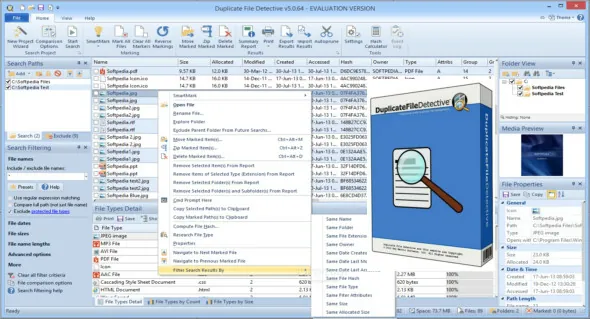
Duplicate File Detective Portable uses state-of-the-art file content analysis technology to show you exactly where your duplicate files are (even when the file names are different). You can search multiple folders, drives, removable storage devices, even network shares – all in a single pass. Then move, zip, or remove duplicate files safely with assistance from our innovative SmartMark duplicate file selection system.
Key Software Benefits
• Reclaim wasted local and network storage resources – archive or remove duplicate files
• Speed up backup processes by reducing storage allocation redundancy
• Gain visibility into what types of duplicates are consuming space and who owns them
• Eliminate time wasted performing virus scans on duplicate files
• Scan and de-dupe file systems of virtually any size with our extreme scalability engine
• Process (move, delete, or zip) duplicates safely with our built-in file management system
• Find duplicates by any combination of attributes, including content-only matching
• De-dupe and clean up your music (MP3, iTunes, etc.) file collection
• Optimized for Windows 11, Windows 10, Windows 8.1, Windows 8, Windows 7, Vista, XP and Windows Server (32 and 64 bit)
The release of Duplicate File Detective 7 includes a wide range of feature enhancements while also retaining the signature product design and workflow upon which hundreds of thousands of users depend. Let’s take a closer look.
IMPROVED PERFORMANCE
Performance was a key focus during the development of Duplicate File Detective 7. Areas of improvement include the file system discovery phase (which is now multi-threaded), faster file type resolution, consolidated internal data storage, faster data exports and imports, faster duplicate file report sorting, and much more.
Fast duplicate file search
The result is a product that’s quicker across the board. These improvements are especially apparent when analyzing remote (network) file systems.
USER INTERFACE & ACCESSIBILITY
We’ve updated Duplicate File Detective’s user interface so that it’s perfectly crisp and clear at any resolution. The product’s ribbon command interface has also been modernized, including updates to the dark mode theme.
Usability has also been improved through the additional of new keyboard shortcuts for operating on selected files.
User interface
IMPROVED PREVIEW WINDOW
Duplicate File Detective’s file preview window has been enhanced to show (partial) text files and PDF documents. It can also now render larger document type icons (when available) and supports M4V multimedia files.
NEW FILE COMPARISON OPTIONS
There are several new duplicate file comparison options available in Duplicate File Detective 7.
Added the ability to ignore times when comparing last modified timestamps.
Added the ability to ignore the “second” portion of times when comparing last modified timestamps.
Added new filename match option that compares only a specified number of start characters.
Added new filename match option that compares only a specified number of end characters.
Added new filename match option that ignores a specified number of end characters.
In addition to the list above, we’ve improved support for audio tag extraction across all supported file formats.
Dupe comparison options
AGGREGATE FILE PROPERTIES
The file property window now includes additional properties for single-file selection, as well a new ability to summarize common properties when multiple duplicate files are selected – including aggregates such as total size, etc.
File properties
IMPROVED HASH CALCULATOR
The Duplicate File Detective hash calculator has uses a new, multi-threaded design for producing file checksums. It also provides a utility toolbar and an improved result layout that includes file icon, file size, and more.
File hash checksum calculator
ADDITIONAL IMPROVEMENTS
Search path validation now considers (and monitors) search path check state.
Improved, smarter default reparse point traversal and processing behaviors.
Results filtering now infers wildcard placement when not specified by the user.
Folders skipped as junctions or symbolic links are now logged (informational severity).
Added path length field to the duplicate file list of the Duplicate File Manager window.
Added protection option that warns when sending long NTFS paths to the Recycle Bin.
Updated hash algorithm implementations with latest fixes and performance improvements.
Duplicate report detailed tooltip is now only shown for the name column.
Improved the speed of folder view tree population for larger workloads.
Duplicate pruning operations are now much faster, especially for remote workloads.
Added duplicate group count to existing main window status bar pane.
Sorting the duplicate results detail view now retains previous full selection.
Hard link tracking is now an explicit option (off by default for performance).
Multi-page welcome wizard has been replaced with a simple, one-page welcome screen.
Duplicate search summary window now includes an overview of search filter configuration.
Updates to help file, including new examples, better high resolution support, and content additions.
Improved handling of Windows default shell context menu actions.
Overhaul of the product evaluation notification window.
Release Notes:
- Improvement: Added a new duplicate folder report view.
- Improvement: Added a duplicate image group visual comparison docking panel.
- Improvement: Results filtering now supports date, size, and numeric ranges.
- Improvement: Improved project wizard with new project types & options.
- Improvement: Added the ability to find duplicate images by metadata or perceptual hash.
- Improvement: Added the ability to find duplicate documents by their properties.
- Improvement: Added copy-pattern stripping option for file name comparisons.
- Improvement: Added comparison option to match words in file names in any order.
- Improvement: Improved duplicate classification data storage performance.
- Improvement: Updated PDF rendering libraries (used by preview window).
- Improvement: Zip compression now supports hardware acceleration.
- Improvement: Improved Hash Calculator dialog window layout.
- Improvement: Redesigned the Comparison Options dialog window.
- Improvement: Improved duplicate search summary window content and design.
- Improvement: Duplicate search summary window content can now be saved as HTML.
- Improvement: Theme-related improvements across all application controls.
- Improvement: Search path indicator badges have been redesigned.
- Improvement: SmartMark notices now report how many files were marked and skipped.
- Improvement: Improved SmartMark performance with very large result sets.
- Improvement: Added new SmartMark action: Mark All Files Outside Master Path(s).
- Improvement: Updated report view checkbox glyphs with cleaner marked/locked icons.
- Improvement: Clarified size-based SmartMark menu item labels.
- Improvement: Added folder browser dialog button for creating a new folder.
- Improvement: Restored main duplicate search report font size option.
- Improvement: Improved print and print preview when using the dark theme.
- Improvement: File preview and property panes now load data off the UI thread.
- Improvement: Excel exports create new worksheets, as needed, to capture large datasets.
- Improvement: Improved Duplicate File Manager layout and error handling robustness.
- Improvement: Improved detail report group contrast when using dark application mode.
- Improvement: Improved usability of the New Project Wizard path selection step.
- Improvement: Preview panel now supports HEIC, AVIF, WebP, JPEG XR, and camera RAW images (Windows codecs permitting).
- Improvement: Image previews now honor embedded EXIF orientation, so photos display upright.
- Improvement: Added modern audio and video formats (MKV, FLAC, WebM, AAC, and more) to the preview panel.
- Improvement: Large audio and video files now play in the preview panel regardless of the image preview size limit.
- Improvement: Increased the amount of text shown by text file previews.
- Improvement: Preview panel now lists the contents of zip archives, including password-protected ones.
- Improvement: SVG previews now scale to fit the preview panel.
- Improvement: Preview panel shows audio tag details when media playback is unavailable.
- Improvement: The preview window now displays zip file listings.
- Improvement: Duplicate File Search progress dialog now represents workloads more accurately.
- Improvement: The preview window now stretches SVG images to match pane size.
- Improvement: Added ribbon bar button for resetting docking pane positions.
- Improvement: New version availability is now reported in the main window.
- Improvement: Command line runs now return a process exit code, so scheduled tasks and batch files can detect failures.
- Improvement: Command line runs now always terminate when finished; the new /NoExit switch keeps the program open instead.
- Improvement: An unexpected error during a command line run is now written to the event log and reported through the exit code.
- Improvement: The scheduled task list now more reliably identifies its own tasks.
- Improvement: Help file content is now online and has been updated extensively.
- Bug fix: Fixed icon state inversion in folder view tree.
- Bug fix: Fixed potential confirmation race condition when cancelling a scan.
- Bug fix: Corrected several menu item misspellings.
- Bug fix: Fixed incorrect character escape logic in CSV and HTML exports.
- Bug fix: SmartMark operations no longer alter files hidden by an active report view filter.
- Bug fix: Fixed marking of the last file in each duplicate group when a view filter is active.
- Bug fix: Fixed HTML export using incorrect background color for main table cells.
- Bug fix: Folder-based marking now matches target folder paths exactly.
- Bug fix: Fixed incorrect low-disk-space check for Move operations in Duplicate File Manager.
- Bug fix: Preview panel no longer renders binary file content as garbled text.
- Bug fix: Monthly schedules set to a particular day of the week now run on the day that was selected.
- Bug fix: Fixed a crash when opening project files created by much older versions of the program.
- Bug fix: Using the /Search and /Exclude command line switches together no longer excludes the folders being searched.
- Bug fix: The Run button in the scheduled task list now reports failures instead of ignoring them.
- Bug fix: Scheduled tasks that have been given more than one trigger or action are no longer missing from the task list.
- Bug fix: The orphaned task check no longer considers scheduled tasks belonging to other programs.
- Bug fix: Fixed a few minor issues with the shell context menu extension.
.