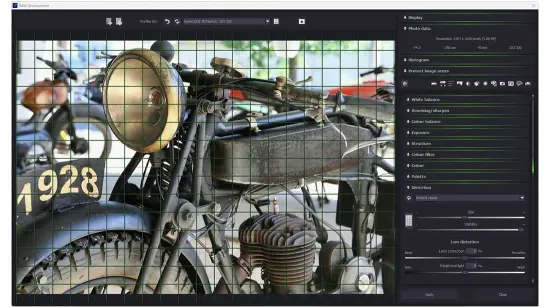
Portable Franzis AI Filter #2 professional 2.23.04374 Multilingual

Franzis AI Filter #2 Portable is a cutting-edge, AI-powered photo editing suite that revolutionizes image enhancement through intelligent neural network algorithms, delivering studio-quality results for photographers, digital artists, and content creators who demand professional-grade filters, stylization effects, and corrective tools without the complexity of manual adjustments.
This standalone Windows and macOS application, part of Franzis’ renowned “Projects” series, leverages deep learning models trained on millions of professional images to automatically apply over 50 AI-driven filters spanning portrait retouching, landscape optimization, artistic rendering, color grading, and creative stylization—transforming ordinary snapshots into magazine-ready masterpieces with one-click presets or customizable parameter tweaks.
Whether enhancing low-light portraits with flawless skin smoothing and eye sharpening, converting cityscapes into cinematic HDR looks, generating painterly oil effects from vacation photos, or performing selective AI inpainting to remove unwanted objects, AI Filter #2 Professional processes RAW, JPEG, TIFF, and PNG files up to 100MP at lightning speed using GPU acceleration, offering non-destructive editing, batch workflows, and plugin integration for Adobe Photoshop and Lightroom, all within an intuitive interface that balances automation with creative control.
AI-Powered Filter Engine
The cornerstone of Franzis AI Filter #2 Portable is its advanced neural processing engine, combining convolutional neural networks (CNNs) for feature detection, generative adversarial networks (GANs) for realistic detail synthesis, and transformer architectures for global image understanding. Upon loading an image, the software instantly analyzes content—detecting faces, skies, foliage, skin tones, edges, and textures—then suggests optimal filter stacks via an AI Assistant that scores compatibility (e.g., “Portrait Perfect: 98% match”) and previews results in real-time. Filters divide into six categories: Portrait (25+ presets for headshots), Nature/Landscape (dynamic range expansion), Artistic (sketch, watercolor, neon glow), Color (LUT grading, split-toning), Effects (bokeh simulation, motion blur), and Expert (20+ new advanced tools in v2).
One-click application yields pro results: “Skin Smoothing AI” erases blemishes while preserving pore texture via frequency separation; “Eye Enhancement Pro” enlarges irises, sharpens lashes, and brightens whites contextually; “Sky Replacement Neural” seamlessly swaps overcast heavens with dramatic sunsets, matching lighting perfectly. Iterative processing divides tasks into stages—denoising first, then sharpening, color correction last—preventing artifact buildup, with user-defined iteration counts (1-50 passes) for refinement.
Portrait Retouching Suite
Portrait specialists rejoice: AI Filter #2 Professional’s dedicated module rivals high-end beauty editors. Face detection (95% accuracy across ethnicities/ages) auto-masks subjects, applying AI Skin Retouch that differentiates texture from flaws—removing acne, wrinkles, and uneven tone while retaining natural freckles and makeup. Teeth Whitening Neural brightens smiles without haloing gums; Slimming Tool reshapes contours non-destructively (nose, jawline, body proportions). New v2 Headshot Optimizer generates LinkedIn-ready profiles from casual selfies, auto-adjusting lighting, backgrounds, and expressions via GAN upsampling.
Batch portrait mode processes family photos or client shoots, with face-grouping to apply consistent “before/after” comparisons. Makeup simulator overlays realistic lipsticks, eyeshadows, and blushes from a 500+ cosmetics library, exportable as layered PSDs.
Landscape and Nature Enhancement
For outdoor shooters, 15 AI landscape filters excel: HDR Fusion AI merges brackets into 32-bit float composites with perfect deghosting for moving clouds/people; Sky AI Perfect detects horizons, replaces/recolors heavens with weather-matched realism (sunrise gradients, starry nights). Foliage Enhancer boosts greens selectively, recovering shadow details without chroma noise. Water Reflection Fix straightens ripples, enhances clarity via wave pattern analysis.
Dynamic range remapping compresses 14EV scenes into printable outputs, with selective dodging/burning guided by saliency maps—brightening faces in backlit portraits without blowing highlights.
Artistic Stylization and Effects
Creatives unleash with 20+ neural style transfer filters emulating masters: Oil Painting AI renders canvas textures with visible brushstrokes; Pencil Sketch Pro generates vector-like line art from photos; Pop Art Neon applies Warhol vibrance with edge glows. Cartoonizer v2 simplifies forms while preserving expressions, ideal for social media avatars.
Position grid enables precise effect placement—apply vignette to corners only, bokeh to backgrounds. Fourier features analyze frequency domains for surreal distortions (wave warps, mosaic tiles). Layer shapes stack effects non-destructively (filter mask1 → color grade → texture overlay).
Color Grading and LUT Management
Professional colorists access AI Color Harmony that auto-balances whites, suggests complementary schemes, and applies cinematic LUTs (50+ film emulations: Kodak Portra, Fuji Velvia, anamorphic flares). Split-toning sliders tint shadows/highlights independently; Vibrance Neural boosts muted colors without oversaturating skin. Custom LUT creator exports .cube files for DaVinci Resolve/Premiere, with area protection masks preserving highlights.
Expert Mode and Advanced Controls
Pro users unlock Expert Mode with 20 new v2 filters: Deblur AI sharpens motion/camera shake via blind deconvolution; Super-Resolution Upscale enlarges 4x without artifacts using diffusion models; Noise Reduction Pro handles ISO 25600+ with luminance/chroma separation. Block size controls (16×16 to 512×512) fine-tune local processing; layer shapes define effect boundaries.
Optimization Assistant auto-suggests parameters, comparing 5 variants side-by-side. Magnifier tool (1:1 pixel view) inspects details; histogram scopes monitor clipping.
Batch Processing and Automation
Industrial workflows shine: batch entire folders (recursive, RAW+JPEG pairs), applying preset chains (denoise → sharpen → style). Priority queue, pause/resume, distributed GPU processing. Macro recorder scripts custom pipelines, exportable for team use.
Performance and Hardware Acceleration
GPU-optimized (NVIDIA CUDA, AMD OpenCL, Apple Metal), RTX 40-series renders 50MP images in <2 seconds/filter. CPU fallback scales to i9/Ryzen 9. 16GB RAM minimum, 32GB recommended for 8K. Non-destructive—edits stack as layers, unlimited undo.
User Interface and Workflow Mastery
Modern tabbed interface centers preview canvas with AI suggestions sidebar, filter browser (searchable thumbnails), properties panel (sliders/tags), and navigator (zoom/fit). Dark/light themes, workspaces (“Portrait Studio,” “Landscape Pro”). Before/after split-view, onion skin for animations.
Integration and Compatibility
Standalone or Photoshop/LR/Affinity plugins (CS6+, LR Classic 13+). Supports tethered capture (Canon/Nikon/Sony), XMP sidecars. Exports PSD (layers preserved), TIFF-16bit, JPEG-XL lossless.
Non-Destructive Editing Pipeline
Layer-based workflow: base image → AI Filter 1 mask → Color Grade → Artistic Overlay. Masks paintable, opacity adjustable, blend modes (30+). History branches experiments.
Use Cases Across Photography
Portraits: Headshot packages, wedding retouch.
Landscapes: Travel posters, real estate HDR.
Products: E-commerce cleanups.
Social: Instagram-ready stylization.
Fine Art: Gallery prints from phone snaps.
Security and Privacy
Offline processing, no cloud. Project files (.aif2) embed edits lossless.
System Requirements
Win10/11, macOS 12+, 16GB RAM, GPU 4GB VRAM.
Getting Started
Import photo→AI Suggest→Apply “Portrait Glow”→Tweak skin slider→Export. 30 seconds to pro.