
Portable Net Eagle 3.1.0
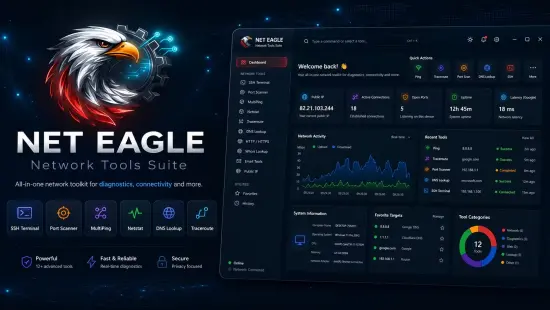
Modern networks have become increasingly complex, requiring powerful diagnostic and monitoring tools to identify problems, optimize performance, and maintain security. Whether managing a small office infrastructure, supporting enterprise systems, or troubleshooting connectivity issues at home, professionals often rely on multiple separate utilities to gather the information they need. Net Eagle Portable addresses this challenge by bringing a broad collection of networking tools into a single, unified environment.
Net Eagle Portable is an advanced network diagnostics and analysis application designed for Windows systems. It combines network discovery, packet inspection, connectivity testing, security evaluation, DNS analysis, email record verification, SSH access, and real-time monitoring capabilities into one integrated platform. Instead of switching between different networking utilities, administrators and power users can access a complete toolkit from a centralized interface.
The software focuses on providing practical functionality for troubleshooting, monitoring, and analyzing networks. By integrating commonly used networking operations within a consistent environment, Net Eagle Portable streamlines workflows and helps reduce the time needed to identify and resolve issues.
Unified Interface Designed for Productivity
One of the most attractive aspects of Net Eagle Portable is its unified design philosophy. The application organizes tools into a tab-based interface, making navigation intuitive and efficient. Users can quickly switch between network scans, packet captures, DNS lookups, traceroutes, SSH sessions, and other modules without launching additional software.
The clean layout promotes better productivity, especially during complex troubleshooting sessions where multiple diagnostic tools may need to be used simultaneously. Information remains accessible, organized, and easy to interpret.
The modern interface is suitable for both experienced network professionals and advanced users who want access to professional networking capabilities without facing unnecessarily steep learning curves.
Advanced Network Discovery Capabilities
Network discovery serves as one of the fundamental functions of Net Eagle Portable. Understanding which devices are connected to a network is often the first step in troubleshooting performance, security, or connectivity problems.
The network scanner allows users to:
- Discover active devices on local networks
- Scan individual IP addresses
- Analyze entire subnet ranges
- Resolve hostnames
- Display MAC addresses
- Identify active services
- Detect open ports
These capabilities provide detailed visibility into network environments. Administrators can quickly determine whether systems are online, identify unknown devices, and gather valuable information about network structure.
The scanning engine helps simplify network inventory management while providing critical data needed during diagnostics and maintenance tasks.
Professional Port Scanning Features
Port scanning remains one of the most useful techniques for identifying active services and understanding system exposure. Net Eagle Portable includes integrated port scanning functionality that helps users evaluate devices and servers efficiently.
The port scanner can be used to:
- Detect listening services
- Verify service availability
- Troubleshoot application connectivity
- Validate firewall rules
- Investigate security concerns
Results are presented in a structured format that allows users to quickly understand which ports are open and how services are responding.
For administrators responsible for infrastructure management, this functionality can significantly simplify routine audits and troubleshooting procedures.
Real-Time Packet Capture and Analysis
Packet analysis is essential when investigating network behavior, diagnosing communication problems, or evaluating traffic flows. Net Eagle Portable includes packet capture capabilities that allow users to monitor traffic directly from network interfaces.
Key packet capture features include:
- Live packet monitoring
- Real-time traffic inspection
- Protocol identification
- Packet filtering support
- Hexadecimal packet views
- Traffic export options
Captured traffic can be analyzed to understand network conversations, identify communication failures, and investigate unexpected behavior.
This functionality transforms Net Eagle Portable into a practical network analysis solution capable of supporting a wide range of diagnostic scenarios.
Export Support for Further Investigation
Diagnostic tasks often require exporting collected information for later review or collaboration with team members. Net Eagle Portable supports exporting captured network data and reports, making it easier to archive findings or perform deeper analysis.
Export functionality enhances workflow efficiency by allowing users to save important information without repeating scans or captures. This capability is especially useful when documenting incidents or preserving evidence for security investigations.
SSH Terminal Integration
Remote administration remains one of the most common networking tasks performed by IT professionals. Net Eagle Portable includes an integrated SSH terminal that enables secure remote access to servers, appliances, and network devices.
The SSH implementation supports:
- Secure remote connections
- Authentication management
- Saved connection profiles
- Remote command execution
- Terminal-based administration
Administrators can perform maintenance, verify configurations, and troubleshoot systems directly from within the application.
The ability to combine network diagnostics with remote management functions significantly improves operational efficiency.
Multi-Host Ping Monitoring
Network availability monitoring often begins with simple but effective ping testing. Net Eagle Portable expands on traditional ping tools by providing support for monitoring multiple hosts simultaneously.
The MultiPing module helps users:
- Monitor several devices at once
- Track connectivity status
- Measure response latency
- Detect interruptions quickly
- Observe network stability over time
Running multiple simultaneous tests provides broader visibility into network performance and helps identify infrastructure issues that may affect multiple systems.
This feature proves valuable for ongoing monitoring as well as troubleshooting intermittent connectivity problems.
Detailed Traceroute Analysis
Traceroute utilities are critical for identifying network path issues and understanding routing behavior between endpoints.
Net Eagle Portable includes visual traceroute capabilities that display hop-by-hop path information along with timing measurements. Administrators can analyze:
- Network routes
- Intermediate hops
- Latency patterns
- Path disruptions
- Routing inefficiencies
By revealing how traffic travels through various network segments, traceroute analysis helps pinpoint problem locations and improve troubleshooting accuracy.
Comprehensive DNS Investigation Tools
DNS issues can affect virtually every internet-based service. Net Eagle Portable provides a powerful collection of DNS diagnostic capabilities designed to simplify domain and infrastructure analysis.
Users can investigate:
- A records
- AAAA records
- MX records
- TXT records
- SPF records
- DKIM entries
- DMARC policies
The DNS tools assist with:
- Domain troubleshooting
- Email service verification
- Security assessment
- Configuration validation
Having multiple DNS functions integrated into a single interface makes domain diagnostics considerably more efficient.
Email Security Record Validation
Email security has become increasingly important due to phishing campaigns, spoofing attacks, and domain impersonation attempts.
Net Eagle Portable includes specialized tools that help analyze email-related DNS records and verify domain protection mechanisms.
Users can review and validate:
- SPF configurations
- DKIM records
- DMARC policies
- MX records
- Related TXT entries
These capabilities help ensure that email systems are properly configured and operating according to recommended security practices.
For organizations focused on improving email deliverability and reducing abuse risks, these tools provide significant value.
SSL and TLS Certificate Inspection
Secure communication depends heavily on properly configured SSL and TLS certificates. Net Eagle Portable includes inspection capabilities designed to evaluate certificate deployments and identify configuration concerns.
Users can examine:
- Certificate details
- Trust chains
- Encryption information
- Negotiation details
- Security parameters
The certificate inspection module helps identify potential issues before they affect users or applications.
Security professionals and system administrators can use these insights to improve service reliability and strengthen communication security.
HTTP and HTTPS Diagnostics
Web-based services represent a critical component of modern IT infrastructure. Net Eagle Portable includes dedicated HTTP and HTTPS testing utilities that assist with service diagnostics and verification.
These utilities allow users to:
- Send web requests
- View response headers
- Examine status codes
- Analyze server responses
- Investigate connectivity issues
The ability to review detailed transaction information makes troubleshooting web applications faster and more effective.
Real-Time Network Monitoring
Continuous monitoring is essential for identifying developing problems before they impact operations.
Net Eagle Portable provides monitoring capabilities that help users track network behavior and evaluate system responsiveness over time.
Monitoring tools support:
- Ongoing host availability checks
- Traffic observation
- Connection status tracking
- Performance evaluation
Real-time visibility helps administrators maintain awareness of network conditions and respond quickly to emerging issues.
Netstat Analysis and Connection Visibility
Active network connections offer valuable insights into system behavior. Net Eagle Portable includes netstat functionality that displays local communications and network activity.
Users can review:
- TCP connections
- UDP sessions
- Local endpoints
- Remote addresses
- Connection states
- Process associations
This information assists in detecting unusual activity, validating application behavior, and troubleshooting connectivity problems.
Public IP Identification
In situations where users need to verify their external internet presence, Net Eagle Portable includes public IP retrieval functionality.
This simple but practical feature allows users to quickly determine:
- Current external IP addresses
- Internet-facing connectivity details
- Remote accessibility information
The capability is especially useful when configuring services, troubleshooting remote access, or verifying ISP-related changes.
Wake-on-LAN Functionality
Managing systems remotely often requires the ability to power devices on without physical access.
Net Eagle Portable supports Wake-on-LAN capabilities, enabling administrators to remotely activate compatible devices across local networks.
Benefits include:
- Reduced downtime
- Simplified maintenance
- Remote management flexibility
- Improved operational efficiency
This functionality is particularly beneficial in business environments where centralized management is important.
Network Topology Visualization
Understanding network structure becomes easier when visual information is available. Net Eagle Portable includes topology visualization features that help users map discovered devices and relationships.
Visual network mapping assists with:
- Infrastructure documentation
- Network planning
- Device identification
- Connectivity analysis
Graphical representations often reveal information that may be less obvious when reviewing raw data alone.
Efficient Workflow for IT Professionals
IT administrators frequently depend on numerous utilities to complete routine troubleshooting tasks. Net Eagle Portable streamlines these operations by consolidating critical networking functions into a centralized workspace.
Instead of switching between separate applications for:
- Port scanning
- Packet capture
- DNS lookups
- SSH administration
- Traceroutes
- Connectivity testing
Users can manage everything from a single environment.
This integrated design improves efficiency while reducing complexity during demanding troubleshooting sessions.
Security-Oriented Diagnostic Environment
Security analysis is woven throughout many of the application’s modules. Rather than focusing solely on performance diagnostics, Net Eagle Portable incorporates numerous features that assist with identifying security-related concerns.
Relevant security functions include:
- Certificate inspection
- Packet analysis
- Open port detection
- Service enumeration
- Email authentication verification
- Connection monitoring
These capabilities make the software valuable not only for network administrators but also for security-conscious professionals seeking deeper visibility into network activity.
Suitable for Multiple User Types
Net Eagle Portable serves a broad audience that includes:
Network Administrators
Administrators can leverage scanning, monitoring, packet analysis, and remote management tools to maintain healthy network operations.
System Engineers
Engineers benefit from detailed diagnostic information, protocol visibility, and infrastructure discovery capabilities.
Security Analysts
Security professionals can evaluate services, inspect certificates, analyze traffic, and assess network exposure.
Technical Support Specialists
Support teams gain access to practical troubleshooting tools that simplify investigation and resolution processes.
Advanced Enthusiasts
Technology enthusiasts interested in networking can explore professional-grade capabilities through a user-friendly interface.
Performance and Usability Benefits
The application’s design emphasizes practical usability while delivering professional-level functionality.
Advantages include:
- Centralized toolkit
- Faster diagnostics
- Reduced software clutter
- Consistent user experience
- Simplified data collection
- Professional monitoring capabilities
These benefits contribute to increased productivity and more efficient troubleshooting workflows.
Why Net Eagle Portable Stands Out
Many network professionals maintain collections of utilities accumulated over years of troubleshooting. While specialized tools remain valuable, constantly switching between them can slow investigation processes.
Net Eagle Portable distinguishes itself by unifying a wide variety of networking functions under one roof. From discovery and scanning to packet capture, remote administration, DNS diagnostics, and security inspection, the software provides an impressive range of capabilities within a single platform.
Its balance of accessibility and depth makes it suitable for both everyday diagnostics and advanced network investigations. The comprehensive feature set allows users to approach networking challenges efficiently while maintaining visibility into critical infrastructure components.
For anyone seeking a versatile network diagnostics solution capable of addressing a broad spectrum of administrative and troubleshooting requirements, Net Eagle Portable represents a capable and practical addition to the Windows networking toolkit.
Features at a Glance
- All-in-one network diagnostics platform
- Network discovery and subnet scanning
- Device identification and hostname resolution
- MAC address detection
- Open port scanning
- Real-time packet capture
- Protocol analysis and filtering
- Packet export capabilities
- SSH terminal integration
- Saved SSH connection profiles
- Multi-host ping monitoring
- Advanced traceroute diagnostics
- DNS record lookup tools
- MX, SPF, DKIM, and DMARC verification
- WHOIS information lookup
- HTTP request testing
- HTTPS diagnostics and analysis
- SSL/TLS certificate inspection
- Netstat connection monitoring
- Public IP detection
- Wake-on-LAN support
- Network topology visualization
- Real-time performance monitoring
- Security-oriented inspection utilities
- Modern tab-based user interface
- Dark and light theme support
- Windows 10 and Windows 11 compatibility
Changelog
Latest Version
- Enhanced network discovery and scanning capabilities
- Improved packet capture performance and export functionality
- Refined SSH terminal experience with streamlined connection management
- Expanded DNS and email diagnostics tools
- Improved SSL/TLS certificate inspection and reporting
- Updated HTTP/HTTPS analysis modules
- Enhanced traceroute visualization and response tracking
- Better real-time monitoring responsiveness
- User interface refinements across diagnostic panels
- Stability improvements and general bug fixes
- Performance optimizations throughout the application
- Improved compatibility with modern Windows environments
- Enhanced reporting and diagnostics workflow efficiency
