
Portable SilentRun Pro 1.0.3 Multilingual
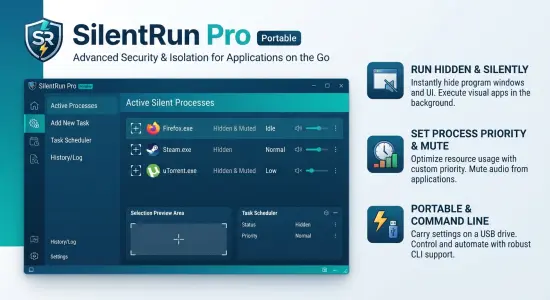
SilentRun Pro Portable is a specialized Windows utility designed to help users run applications quietly in the background while keeping the desktop organized and free from unnecessary distractions. Unlike conventional application management tools that simply launch programs and leave their windows visible, SilentRun Pro Portable focuses on reducing visual clutter by hiding application windows, controlling process priorities, and allowing selected software to operate discreetly without interfering with the user’s workflow.
Many Windows users regularly work with numerous applications simultaneously. Productivity tools, monitoring software, automation utilities, communication platforms, update managers, synchronization tools, and maintenance programs often remain active during the day. While these applications serve important purposes, their windows can occupy valuable screen space and create an increasingly crowded desktop environment. SilentRun Pro Portable addresses this challenge by providing a practical solution that enables programs to continue running normally while remaining hidden from view.
The software is particularly useful for users who value a clean workspace, need to run background tasks continuously, or prefer minimizing distractions during work sessions. Whether managing business applications, automation workflows, development environments, monitoring tools, or personal utilities, SilentRun Pro Portable offers a convenient way to maintain system functionality without filling the desktop with unnecessary windows.
What Is SilentRun Pro Portable?
SilentRun Pro Portable is a Windows system utility designed to run applications silently in the background while giving users control over visibility and process behavior. The software can hide program windows and interfaces, helping users maintain an uncluttered desktop without terminating active processes.
Instead of minimizing applications to the taskbar or leaving them visible on the screen, SilentRun Pro Portable allows users to move selected programs into a hidden operational state. The applications continue functioning normally, but their graphical interfaces remain out of sight.
This capability makes the software particularly valuable for users who operate multiple programs simultaneously and want greater control over their workspace organization.
The utility combines simplicity with practical functionality, making it suitable for both casual users and advanced professionals who regularly manage numerous Windows applications.
Clean Desktop Management Made Easy
A cluttered desktop can negatively impact concentration, efficiency, and workflow organization. As the number of active applications grows, screen space becomes increasingly limited, making it difficult to focus on important tasks.
SilentRun Pro Portable helps solve this problem by enabling users to selectively hide applications that do not require direct interaction. Instead of closing software and restarting it later, users can keep important programs running silently in the background.
This approach offers several advantages:
- Reduced desktop clutter
- Improved focus and concentration
- Cleaner workspace organization
- Faster multitasking environments
- Simplified application management
- Better visibility for important tasks
For users who regularly juggle multiple programs throughout the day, these improvements can significantly enhance productivity and comfort.
Intuitive User Interface
One of the most appealing characteristics of SilentRun Pro Portable is its ease of use. The software features a straightforward interface that allows users to manage background applications without navigating through complicated menus or advanced technical settings.
The design emphasizes accessibility. Users can quickly identify the target application and apply silent-running functionality through a visual workflow. This reduces the learning curve and allows even inexperienced users to benefit from the software’s capabilities immediately.
Rather than overwhelming users with countless configuration panels, SilentRun Pro Portable focuses on essential controls that directly support everyday tasks.
The result is an application that feels lightweight, responsive, and highly practical for real-world usage.
Running Applications Silently in the Background
The core purpose of SilentRun Pro Portable is to allow applications to continue running without occupying visible screen space. This can be extremely useful in a variety of scenarios where software needs to remain active but does not require constant monitoring.
Examples include:
- Synchronization tools
- Backup software
- Automation utilities
- Database maintenance tasks
- Monitoring applications
- Logging utilities
- Network tools
- Communication services
- Update managers
- Development environments
Instead of consuming valuable desktop space, these programs can operate discreetly while users focus on primary work activities.
This functionality makes SilentRun Pro Portable an attractive solution for individuals who want improved desktop organization without sacrificing active processes.
Application Window Hiding Technology
Window management is one of the software’s strongest capabilities. Users can hide selected application windows while allowing those applications to remain active in memory and continue performing their intended tasks.
This differs significantly from simply closing a program. When an application is closed, ongoing processes may terminate and unsaved progress can be lost. SilentRun Pro Portable avoids this issue by preserving application operation while removing visual distractions.
The hidden applications can later be restored whenever needed. This flexibility makes the software useful for both temporary workspace management and long-term background operation.
Users maintain access to their applications while benefiting from a cleaner and more organized desktop environment.
Background Process Priority Control
Another valuable capability of SilentRun Pro Portable is its ability to adjust process priorities.
Windows assigns processing resources to applications based on priority levels. Managing these priorities can help balance system resources more effectively, especially when several applications are running simultaneously.
SilentRun Pro Portable allows users to increase or decrease the priority assigned to specific background processes.
This feature can be beneficial when:
- Reducing resource consumption of non-essential applications
- Allocating more processing power to critical tasks
- Improving performance stability
- Balancing multitasking workloads
- Optimizing resource distribution
For power users and professionals, process priority control adds another layer of flexibility to system management.
Silent Audio Operation
Certain applications produce sounds, notifications, alerts, or media playback that may become distracting during work sessions. SilentRun Pro Portable includes functionality that can help users maintain a quieter computing environment.
By reducing interruptions from selected software, users can focus more effectively on current tasks. This can prove especially useful in office environments, educational settings, libraries, and shared workspaces where minimizing distractions is important.
The ability to combine hidden execution with reduced audio interruptions further enhances the software’s role as a productivity-oriented utility.
Managing Multiple Hidden Applications
SilentRun Pro Portable is not limited to hiding a single application. Users can manage multiple programs simultaneously, creating a streamlined workspace while maintaining the functionality of various background processes.
This capability becomes increasingly useful as the number of running applications grows throughout the workday.
Users can maintain orderly control over:
- Business applications
- Productivity tools
- Automation systems
- System maintenance software
- Communication clients
- Monitoring solutions
- Specialized utilities
Having centralized access to multiple silent processes makes workflow management substantially more efficient.
Ideal for Productivity Enthusiasts
Productivity-focused users are often searching for ways to reduce distractions and improve focus. SilentRun Pro Portable aligns perfectly with these goals.
A crowded desktop can create visual noise that constantly draws attention away from priority tasks. By hiding unnecessary windows while preserving functionality, the software helps establish a cleaner and more focused work environment.
Many professionals use multiple support applications throughout the day. These tools are necessary but rarely require direct interaction. SilentRun Pro Portable allows these applications to remain operational without competing for visual attention.
This simple change can contribute to a more comfortable and productive workflow.
Useful for Developers and Technical Users
Software developers, IT professionals, and advanced users often run numerous utilities simultaneously while working.
Development environments may include:
- Compilers
- Monitoring tools
- Debugging utilities
- Database services
- Version control clients
- Automation scripts
- Testing tools
Managing all these applications efficiently can become challenging. SilentRun Pro Portable provides a practical mechanism for keeping support tools operational while minimizing interface clutter.
The result is a cleaner workspace that allows technical users to concentrate on primary tasks without sacrificing access to important background services.
Command Line Functionality
SilentRun Pro Portable also appeals to advanced users through its command-line capabilities.
Command-line support allows applications to be launched and managed through scripts, automation workflows, batch files, and administrative procedures.
This significantly expands the software’s flexibility beyond standard graphical usage.
Organizations, system administrators, and technical professionals can integrate SilentRun Pro Portable into automated workflows where applications need to start silently without presenting user interfaces.
This level of automation support helps make the software suitable for both personal and professional environments.
Lightweight System Resource Usage
Many users prefer utility software that performs its tasks efficiently without consuming excessive system resources. SilentRun Pro Portable is designed as a focused tool with a specific purpose rather than a large all-in-one management suite.
Its lightweight nature helps ensure that system resources remain available for the applications that need them most.
This characteristic is especially valuable on systems running multiple concurrent processes where resource optimization can have a noticeable impact on overall performance.
Practical Use Cases
Office Productivity
Office users frequently run communication tools, document management systems, synchronization services, and support utilities. SilentRun Pro Portable helps keep the desktop organized while these applications continue operating in the background.
Remote Work
Remote professionals often rely on numerous applications throughout the workday. Hiding secondary tools can reduce distractions and create a cleaner virtual workspace.
System Monitoring
Monitoring utilities often need to remain active continuously. SilentRun Pro Portable allows them to run without occupying valuable screen real estate.
Software Development
Development workflows typically involve multiple supporting processes. Hidden execution helps developers maintain an organized environment while preserving access to essential tools.
Automation Tasks
Users who rely on scripts, scheduled jobs, and automation workflows can benefit from silent execution that keeps operational processes out of the way.
Advantages of SilentRun Pro Portable
SilentRun Pro Portable offers numerous benefits for Windows users seeking better control over active applications.
- Simple and user-friendly interface
- Ability to hide application windows
- Run multiple programs silently
- Clean desktop organization
- Reduced visual distractions
- Background process management
- Process priority adjustment
- Support for silent operation
- Command-line functionality
- Improved multitasking workflow
- Enhanced productivity
- Centralized hidden process management
- Suitable for home and professional environments
- Efficient resource usage
- Quick application restoration when needed
Final Thoughts
SilentRun Pro Portable is a practical Windows utility designed to help users reduce desktop clutter and improve workflow efficiency. By allowing applications to run silently in the background, hide their interfaces, manage process priorities, and maintain access to active software without visual distractions, it provides an effective solution for users who regularly multitask or operate numerous programs simultaneously.
The combination of simplicity, lightweight operation, background process management, and command-line flexibility makes SilentRun Pro Portable suitable for a wide range of users, from casual home users to developers, administrators, and productivity enthusiasts. Anyone looking for a cleaner desktop environment while preserving application functionality will find this software a valuable addition to their Windows toolkit.
Features at a Glance
- Run multiple programs silently in the background
- Hide application windows and interfaces
- Keep applications active while hidden
- Manage multiple background processes simultaneously
- Adjust running process priorities
- Reduce desktop clutter
- Improve workspace organization
- Optional silent audio operation
- Restore hidden applications instantly
- Simple drag-and-select workflow
- Command-line operation support
- Launch applications silently through scripts
- Support for executable parameters
- User-friendly interface
- Lightweight resource consumption
- Suitable for productivity-focused workflows
- Useful for developers and IT professionals
- Compatible with modern Windows systems
- Portable deployment flexibility
- Professional process management capabilities