Portable Macrorit Partition Extender Technician 2.6.2 (x64)

Macrorit Partition Extender Portable is a specialized, technician‑oriented disk‑management utility designed to simplify the extension, resizing, and consolidation of partitions on Windows systems without data loss. Tailored for IT professionals, system administrators, and advanced home users, the software focuses on solving one very common pain point: low disk space on the system or data drive. Instead of relying on full‑disk re‑partitioning, backups, or OS re‑installation, the application allows users to quickly reclaim unused space from adjacent volumes and merge it into the partition that is running out of room, all while preserving the existing files and the operational integrity of the system.
Unlike generic partition tools that require multiple manual steps, Macrorit Partition Extender Portable streamlines the resizing workflow into a small set of intuitive, guided operations. The result is a tool that feels lightweight and purpose‑built, yet robust enough to handle critical server and workstation environments where downtime and data loss are not acceptable.
Core Functionality and Use Case
At its core, Macrorit Partition Extender Portable is engineered to extend volumes that have become too small—especially the primary system partition (C: drive) on Windows installations. When users constantly see “low disk space” warnings or find that the OS drive fills up shortly after a fresh install, this tool provides a straightforward way to solve the problem from within the live operating system, without rebooting into a separate recovery environment or external boot media.
The software excels at finding contiguous free space on the same physical disk and re‑allocating it to the target partition. In many cases, a single operation is enough to expand a cramped system drive into a much larger volume, effectively postponing the need to migrate the OS to a new disk or re‑partition the entire drive from scratch. This capability is particularly valuable in environments where the original partition layout was set during OS setup and cannot be easily changed without disrupting services or applications.
Extending the System Partition
One of the primary scenarios the application is optimized for is extending the Windows system partition when it is running out of space. Many users install Windows with a relatively small C: drive, assuming that applications and data will live on separate volumes, only to find that the OS drive fills up due to Windows updates, temporary files, and application caches. Macrorit Partition Extender Portable allows administrators to reclaim space from a neighboring partition—such as a data or secondary volume—and extend the system drive within the running OS, usually without requiring a reboot.
The process is tightly controlled: the software analyzes the target disk layout, identifies available unallocated or unused space, verifies that the extension is physically possible, and then applies the resize operation in a way that keeps the boot environment intact. This reduces the risk of creating a non‑bootable system, which is a common concern when manually resizing the primary partition.
Automatic Space Detection and One‑Click Operations
A key usability feature of Macrorit Partition Extender Portable is its ability to automatically detect and utilize available free space on the disk. Instead of forcing users to manually shrink neighboring partitions and create unallocated space, the tool identifies space that can be safely repurposed and merges it into the target volume with minimal configuration. In many typical cases, the software can perform a “max‑extend” operation, growing the selected partition to the maximum size supported by the underlying disk layout with a single click.
This automation significantly reduces the technical barrier for IT support staff and desktop technicians who may not be comfortable with deeper partition‑table mechanics. The software abstracts away the need to worry about where the unallocated space is located, how it was created, or which adjacent partitions are affected, while still maintaining the underlying safety checks that prevent invalid layouts or file‑system corruption.
Safe Shrink and Merge Operations
When unallocated space is not directly adjacent to the target partition, Macrorit Partition Extender Portable can still assist by guiding the user through the process of shrinking a neighboring volume to create usable space. The tool can perform controlled shrink operations that relocate file‑system contents to keep the partition structurally sound, then automatically merge the resulting unallocated space into the partition that needs expansion.
Throughout these operations, the software tracks the location of important file‑system structures such as boot sectors, volume headers, and metadata tables, ensuring that the partition remains consistent and bootable. The combination of automatic merging and intelligent shrink behavior makes it possible to reconfigure complex layouts with fewer manual steps and lower risk.
Support for Modern Disk Layouts and File Systems
Macrorit Partition Extender Portable is built to support the most common Windows disk layouts, including both MBR (Master Boot Record) and GPT (GUID Partition Table) configurations. This ensures that the tool can be used on legacy systems as well as newer machines that ship with large solid‑state drives and UEFI‑based boot environments. The software understands the constraints of each partitioning scheme and respects the maximum number of partitions, alignment rules, and boot‑partition requirements defined by those standards.
On the file‑system side, the application is optimized for NTFS and FAT32 volumes, the two most prevalent file systems on Windows installations. NTFS partitions benefit from advanced resizing logic that preserves journaling structures and metadata, while FAT32 volumes are handled with care to avoid truncating clusters or breaking directory chains. This dual‑support model makes the tool suitable for both modern operating systems and older systems or external storage devices that may still use FAT32.
Online Resize Without Formatting
One of the most important characteristics of Macrorit Partition Extender Portable is that it operates on volumes “online,” meaning that the partitions can be resized while Windows is actively using them. The software does not require the user to format the partition or erase its contents in order to change its size; instead, it safely shifts file‑system objects within the existing allocation structure to accommodate the new dimensions.
This non‑destructive approach is critical for server and workstation environments where formatting a drive would mean significant downtime and data migration. The tool is designed to keep the file system in a consistent state throughout the process, minimizing the window of vulnerability where a failed operation could leave the drive inaccessible. In the event of an interruption, the software can often roll back or leave the partition in a recoverable state so that standard chkdsk or repair tools can intervene.
Technician‑Focused Interface and Workflow
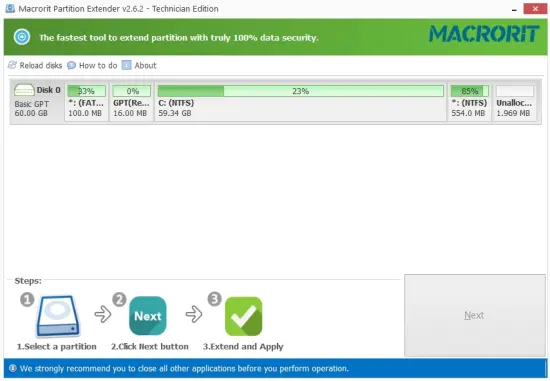
Macrorit Partition Extender Portable presents a clean, task‑oriented interface that prioritizes the most common partition‑extension scenarios. On startup, the software displays a graphical representation of the connected disks and their partitions, highlighting which drives are running low on space and which ones have free capacity available. This visual overview allows technicians to quickly identify candidates for extension and understand the relationships between volumes without diving into low‑level partition‑table details.
The workflow is deliberately linear: users select a target partition, choose the operation (extend, shrink, or merge), review the proposed size change, and confirm the action. Each step is accompanied by clear status messages and size summaries, making it easy to double‑check that the operation is safe before proceeding. For organizations with standardized procedures, the predictable, wizard‑like sequence also makes it easier to document and train staff on proper usage.
Mouse and Keyboard‑Driven Efficiency
Despite its guided nature, the tool is also efficient for power users who prefer keyboard shortcuts and direct manipulation. Technicians can often resize a partition with a handful of clicks and a single confirmation, and the interface avoids the deep, nested menus that can slow down routine maintenance tasks. This balance between simplicity and speed ensures that the software fits naturally into a technician’s day‑to‑day toolbox, whether they are servicing a single workstation or rolling out a standardized disk‑layout fix across multiple machines.
Data Safety and Error Prevention
Macrorit Partition Extender Portable places strong emphasis on data safety, especially when working with the system partition or mission‑critical server volumes. Before executing any resize or merge operation, the software performs a series of checks that verify the integrity of the target volume, the availability of rollback space, and the compatibility of the proposed layout with the underlying disk structure. If any condition is not met—such as lack of necessary unallocated space or a misaligned partition—the tool will pause and notify the user rather than proceeding automatically.
The software also includes safeguards against common user mistakes, such as accidentally selecting the wrong drive or attempting to shrink a partition below a safe threshold. In these situations, the interface can warn about potential consequences, suggest alternative strategies, or block the operation altogether until the user adjusts the parameters. These protections are particularly valuable in high‑pressure environments where technicians are working on multiple machines and may be prone to configuration errors.
Non‑Invasive Design
Unlike some aggressive partition tools that may rewrite large portions of the disk or re‑allocate entire sections, Macrorit Partition Extender Portable is designed to be as non‑invasive as possible. It primarily adjusts the boundaries and internal allocation tables of existing partitions, leaving most of the raw data untouched. This minimally invasive approach reduces the time required for each operation and lowers the risk of triggering file‑system corruption or controller timeouts, which can occur with more intensive repartitioning routines.
Server and Enterprise Readiness
Macrorit Partition Extender Portable is suitable for use in server environments as well as on desktop systems. It can help administrators resolve low‑disk‑space problems on Windows Server roles—from domain controllers to file servers and database hosts—without forcing a full re‑installation of the operating system or a risky migration to a new drive. The software’s ability to operate on live volumes and its support for both MBR and GPT layouts make it a flexible option for environments that mix legacy and modern hardware.
In larger organizations, the tool can be part of a standardized maintenance kit deployed via remote management solutions or portable USB drives. Technicians can carry the utility on a bootable pendrive or run it from a shared network location, enabling them to address partition‑space issues quickly during on‑site or remote support sessions. The small footprint and focused feature set make it easy to justify deploying the tool across multiple locations without introducing unnecessary complexity into the IT environment.
Portable and Lightweight Deployment
The application is designed to be lightweight and easy to deploy, often requiring only a single executable or installer package. For environments that need to avoid complex installations or registry changes, the software can be run in portable mode from a removable drive, allowing technicians to perform partition extensions on systems where local software installation is restricted. This portability is a major advantage for managed service providers and help‑desk teams that need to service a wide variety of customer hardware without leaving behind permanent software artifacts.
Support for Common Windows Platforms
Macrorit Partition Extender Portable is compatible with a broad range of Windows operating systems, including both 32‑bit and 64‑bit editions from older versions of Windows through the latest releases. This backward and forward compatibility ensures that the same toolset can be used across heterogeneous environments without the need to maintain multiple partition‑management utilities for different OS versions.
On each supported platform, the software interfaces with the underlying Windows storage and volume management APIs to perform operations in a way that remains consistent with the host operating system’s expectations. This integration helps avoid conflicts with built‑in tools such as Disk Management or third‑party utilities that might otherwise misinterpret a resized or merged partition.
Integration with Existing Disk Toolkits
For organizations that already maintain a suite of disk utilities, Macrorit Partition Extender Portable can act as a specialized component focused on volume extension and consolidation. It complements broader partition managers and cloning tools by providing a streamlined solution for the specific problem of “small C: drive.” This division of responsibilities allows teams to keep their toolkit lean and focused, with each tool handling a well‑defined aspect of disk management.
Practical Workflows and Daily Use
In day‑to‑day use, Macrorit Partition Extender Portable typically enters the workflow when a machine begins to show persistent low‑disk‑space warnings or when performance degrades due to a full system drive. A technician can connect to the machine, launch the tool, identify the partition that needs expansion, and apply the resize operation within minutes. For many common configurations, the “one‑click extend” or “max‑extend” option is sufficient to resolve the immediate crisis, after which routine cleanup and optimization tasks can be scheduled separately.
On servers, the software is often used in advance of major Windows updates or application rollouts, which can significantly increase the size of system files and temporary directories. By proactively extending the system partition, administrators can prevent update failures caused by insufficient free space and reduce the need for emergency maintenance during critical change windows.
Documentation and Training
The tool’s narrow feature set and straightforward workflow make it easy to document and train staff on proper usage. Organizations can create short standard operating procedures that walk desktop support teams through a typical partition extension, including screenshots of key dialogs and guidance on when to avoid certain operations. The clarity of the interface and the explicit confirmation dialogs also help reduce the risk of accidental operations that could disrupt users or services.
Summary
Macrorit Partition Extender Portable is a focused, professional‑grade utility that addresses the very common problem of insufficient disk space on Windows partitions, especially the system drive. By automating the detection and reallocation of free space, performing online, non‑destructive resizes, and providing a clean, technician‑oriented interface, the software makes it possible to extend volumes quickly and safely without the need for re‑formatting, re‑installation, or complex manual partitioning.
Its support for both MBR and GPT layouts, compatibility with modern Windows versions, and emphasis on data safety make it suitable for everything from single‑seat workstations to enterprise servers and managed service environments. In environments where every minute of downtime counts and every misstep on the disk can have serious consequences, Macrorit Partition Extender Portable offers a reliable, lightweight, and purpose‑built way to keep partitions at the right size, users productive, and systems running smoothly.